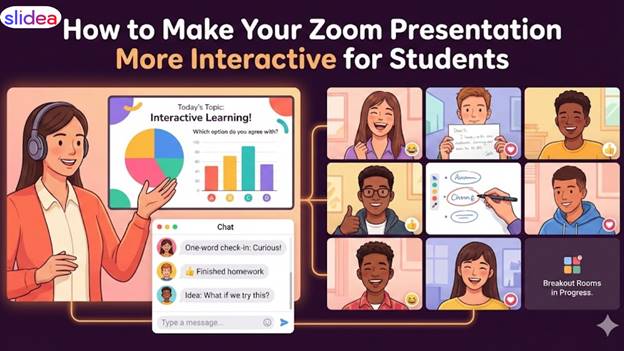
Zoom has developed from a video-calling tool to a virtual classroom, a platform for collaboration, and even a place for students to express their creativity. However, it can be difficult to keep students on Zoom. The focus goes quickly. A single static slide, a lengthy lecture, or a lack of engagement can easily remove people from the class.
The good news? A presentation doesn’t have to feel like a one-way lecture. With simple techniques and human-first approaches, you can make your Zoom session lively, interactive, and meaningful for every student in the room.
This tutorial explores practical, relatable ways to make your Zoom presentation more interactive; it is based on real classroom situations teachers have experienced daily.
What is a Zoom presentation?
A Zoom presentation involves a presentation made on a video-conferencing platform, whereby one shares the screen, slides, or content while speaking to an online audience. It works just like a regular face-to-face presentatio, butn happens virtually.
In Zoom, a presentation happens this way: students or participants view the slides, listen to the presenter, and engage through features such as chat, reactions, polls, and breakout rooms.
Key Elements of a Zoom Presentation
1. Screen Sharing
The presenter shares:
- PowerPoint slides
- PDFs
- Documents
- Videos
- Browser windows
This becomes the visual part of the presentation.
2. Video & Audio
The presenter speaks while the audience listens.
Participants may turn on their cameras or stay muted, depending on how the session is set up.
3. Interaction Tools
Zoom includes the following built-in engagement features:
- Chat
- Polls
- Breakout rooms
- Q&A
- Annotations
- Raise hand
These make the session interactive and two-way.
4. Virtual Meeting Space
Zoom serves as a digital classroom, meeting room, or event space.
People can join from anywhere by using:
- Laptops
- Mobiles
- Tablets
Why Zoom Presentations Are Popular
Zoom presentations are widely used because they are:
- Easy to access
- Ideal for remote classrooms
- Great for virtual corporate meetings
- Useful for workshops, webinars, and training
- Flexible and convenient.
Simple Example:
A teacher wants to explain a chapter. They log into Zoom, share PowerPoint slides, discuss each topic, ask questions, utilise polls, and engage with the students. This becomes a presentation over Zoom.
1. Start With an Icebreaker That Feels Human
The first few minutes of the session set the tone for the entire thing. Students connect when the introduction is warm, casual, and conversational.
Here are some effective ideas for Zoom classes:
“One-word check-in”: Instruct students in the chat to type one word that describes how they are feeling.
Emoji Reaction Poll: Have them respond with 👍 or 👎 to a simple question (“Did you finish homework?” “Are you awake?”).
Quick photo challenge: “Show one object near you that describes your day.”
These small tasks are used to mentally prepare everyone for the session before learning begins.
2. Convert Simple Listening into Engaged Participation.
Interaction helps students stay informed. If people only look at your screen, they will ultimately check out.
Try the following techniques:
- Ask questions carefully.
- Not random questions, but questions that encourage kids to brainstorm:
- “Why do you think this occurred? “
- “What would you do differently?” “
- “What comes to mind when you see this? “
Even shy kids are more comfortable responding in the chat.
Use breakout rooms for short conversations.
Provide clear directions and a time limit. For example: “You have three minutes. Discuss and return with one line summarising your group’s concept.” This gives students the freedom to communicate, share, and think without distraction.
3. Use interactive tools to make learning hands-on.
Students love to click, vote, and answer questions—not just listen.
Here are simple tools that boost engagement:
Polls
Zoom has a powerful built-in poll feature.
You can ask:
- Which option do you agree with?
- “What do you think will happen next?”
- Which one would you like to learn about first?
- Instant results keep students curious.
Quizzes
Short quizzes-especially unexpected ones-shake things up.
Just 3–4 questions are enough to refocus attention.
Word clouds
Ask students to describe a concept in one word.
It feels fun and collaborative to see their words form a cloud in real time.
Annotations
Allow students to circle, underline, or mark items on a shared screen.
This creates a feeling of co-creation rather than passive viewing.
Many teachers now use interactive presentation software that was first made for office training to make online classes more fun.
4. Keep Slides Simple, Clear, and Student-Friendly
When teaching over Zoom, your slides matter even more than in a physical classroom. Busy slides can overwhelm students quickly.
Here’s what helps:
- Use large fonts that are easily readable even on phone screens.
- Limit text to one idea per slide.
- Use visuals—images, icons, simple diagrams—to explain complex ideas.
- Keep contrast strong, so that the content stands out.
5. Narrate stories and provide real examples.
Stories are more relatable to students than theories.
Whether you’re teaching a scientific concept or a business model, try adding:
- The story of a real person
- A mistake that taught a lesson
- A funny incident
- A behind-the-scenes explanation
- A case study to which they can relate
Stories make your presentation feel human. They help students remember the topic long after the class is finished.
6. Gently Encourage Students to Keep Cameras On Without Forcing It
Not all students feel comfortable showing their video—and that’s okay.
But having some cameras on does add emotion and make the session feel more real.
You can say things like:
“If you’re comfortable, feel free to turn your camera on so we can learn together.
“No pressure—just do what works for you.”
Soft, respectful encouragement creates a safe atmosphere where students feel seen.
7. Make Use of the Chat Like a Dialogue Box
Some students hate speaking on the mic but love to type.
Use the chat as an equal-opportunity learning space:
- Ask “type your answer, even if it’s one word.”
- Let students drop links, ideas, or short thoughts.
- Use chat to collect anonymous opinions.
Chat is the mutual notebook where every voice counts.
8. Incorporate Movement Breaks to Reset Energy
Zoom exhaustion is real.
A 30-second break or a 1-minute fun activity can refresh the mind.
Try: “Stand and stretch your arms.”
“Walk around your room and come back in 20 seconds.”
“Look away from the screen for 10 seconds.”
These micro-breaks improve attention and participation.
9. End with a review rather than goodbye.
A meaningful ending makes the session memorable.
You can conclude with:
One takeaway question: “What is the one thing you learned today?”
One line of appreciation: “Thank someone in the group for helping today.”
One self-check: “Rate your understanding from 1–5.”
Students leave the session with clarity, not confusion.
Final Thoughts
Interactive Zoom presentations aren’t about technology; they’re about connection.
Simple things such as asking insightful questions, using polls, creating clean slides, and incorporating short activities can change your class completely. When students feel involved, they learn better, focus longer, and enjoy the session more. Whether you’re a teacher, trainer, or educator, these techniques can help you facilitate the creation of an energetic, inclusive, and humane classroom-even through a screen.