



Keeping up with TikTok, Instagram Reels, and YouTube Shorts means constantly producing fresh content. But creating visuals, generating footage, and editing videos can take hours. Pollo AI brings these tasks together in one creative suite, helping creators streamline production. This guide covers how to use its AI models and creative tools to make engaging social media videos faster.
What Is Pollo AI? More Than a Collection of AI Generators
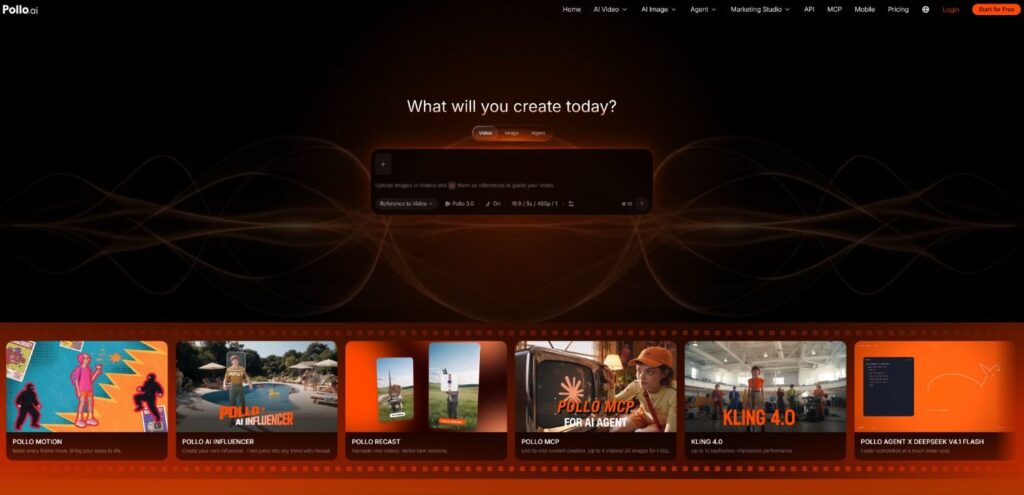
Pollo AI is an AI-native creative suite for creators and marketers who need an efficient way to produce social media videos. It combines video and image generation, audio tools, specialized studios, and multiple AI models in one platform. Current model options include Kling 4.0, Seedance 2.5, MiniMax H3 Max, Wan 3.0, Vidu Q4, Veo 3, and Sora 2.
Beyond individual generators, the platform offers dedicated tools for different projects. Marketing Studio supports UGC ads, product videos, URL-to-video ads, and photo-to-video ads. Pollo Agent turns briefs, scripts, URLs, and visual references into video projects, while Pollo Director provides scene development, character consistency, audio, captions, and timeline editing. Pollo Recast helps creators remix popular video formats with new creative elements.
Image editing, background removal, upscaling, and the Brand Kit also help prepare campaign visuals and maintain consistent branding.
These features serve different needs. Individual creators can turn an idea into a Reel, online stores can make product ads from existing assets, and marketing teams can develop campaign variations without rebuilding every video from scratch.
How to Create Social Media Videos Faster with Pollo AI
Step 1: Choose a Suitable Creation Workflow
Start with the video format. Text-to-video and image-to-video work well for quick clips, while Marketing Studio is suited to product promotions and UGC ads. Pollo Agent can handle broader creative briefs, and Pollo Director is a better fit for multi-scene stories.
Choosing the right workflow early helps avoid unnecessary tool switching.
Step 2: Prepare Visual Assets and References
Gather product photos, campaign images, scripts, or visual references before generating footage. Pollo AI offers image generation, background removal, photo editing, and upscaling tools to prepare these materials.
The Brand Kit can keep logos, colors, and fonts consistent across posts. For example, a skincare brand can reuse approved product images in tutorials, promotional Reels, and product demonstrations.
Step 3: Generate Clips with the Right AI Model
Pollo AI supports text-to-video, image-to-video, and reference-to-video creation. Text-to-video builds scenes from written ideas, image-to-video adds motion to existing visuals, and reference-to-video helps guide the output with examples.
Creators can compare models such as Kling 4.0, Seedance 2.5, and MiniMax H3 Max based on the footage they need. Product videos may require realistic lighting and controlled camera movements, while travel clips often benefit from wider compositions and dynamic motion.
Step 4: Edit Clips and Add Audio
Once the footage is ready, creators can assemble the clips into a cohesive video. Pollo Director helps organize scenes, maintain character consistency, adjust pacing, and edit through a multitrack timeline.
For narration and sound design, Pollo AI also offers text-to-speech, AI voice generation, voice cloning, and sound effect generation. Captions help make videos easier to follow, even when viewers have their sound turned off.
Step 5: Adapt Videos for Different Platforms
A TikTok video may need a different cut for Instagram Reels or YouTube Shorts. Adjust the aspect ratio, framing, pacing, and opening shot to suit each platform.
A product campaign, for instance, could include a short Reel, a detailed YouTube demonstration, and a separate cut highlighting one key selling point for paid ads. Marketing Studio can help create variations for different promotional formats.
Tips for Making Better Social Media Videos
Hook Viewers Early
Put the product, main benefit, or strongest visual near the beginning. Short-form videos rarely need lengthy introductions.
Write Clear Prompts
Describe the subject, action, setting, lighting, and camera movement. Keeping each clip focused on one main action makes the result easier to control.
Reuse Visual References
Characters, products, and backgrounds can vary between generations. Reusing approved reference images helps maintain consistency across a series of posts.
Review Before Publishing
Check product details, transitions, captions, logos, and audio. If one scene needs improvement, regenerate that clip rather than restarting the entire video.
Conclusion
Creating social media videos faster comes down to choosing the right tools and avoiding repetitive work. Pollo AI combines multiple video models, image and audio tools, Marketing Studio, Pollo Agent, Pollo Director, and Pollo Recast in one creative suite. Whether the goal is a quick Reel or a multi-scene product campaign, creators can build a workflow that fits the content without switching between multiple production platforms.