In today’s digital world, privacy is no longer optional—it’s essential. From online banking and shopping to social media and work files, our computers store vast amounts of sensitive data. Cybercriminals, trackers, spyware, and malware are constantly evolving to exploit weak systems. That’s why using a reliable security solution like IObit Malware Fighter is a crucial step toward protecting your personal information and maintaining full control over your privacy.
This complete privacy guide explains what IObit Malware Fighter is, why privacy protection matters, its key features, and a step-by-step guide on how to use it effectively.
What Is IObit Malware Fighter?
IObit Malware Fighter is a powerful anti-malware and privacy protection program developed by IObit to detect, block, and remove a wide range of digital threats. The free version offers strong real-time defense against malware, spyware, ransomware, trojans, adware, and phishing attacks—without slowing down your system.
Unlike basic antivirus tools that focus only on known viruses, IObit Malware Fighter takes a broader approach. It combines malware detection, browser security, behavior monitoring, and privacy protection to safeguard both your system and your personal data. This makes it an excellent choice for users who want comprehensive protection without complicated settings.
Why Is Privacy Protection Important?
Every time you go online, your data is at risk. Hackers don’t just target large companies; everyday users are often easier targets. Here’s why privacy protection is critical:
- Personal data theft: Passwords, banking details, emails, and documents can be stolen and misused.
- Online tracking: Advertisers and third-party trackers monitor your browsing behavior without consent.
- Identity fraud: Stolen data can be used to impersonate you online.
- Performance issues: Malware and junk files slow down your system and compromise stability.
A strong privacy tool like IObit Malware Fighter helps block these threats before they can cause harm, ensuring safer browsing, secure transactions, and peace of mind.
Benefits of Using IObit Malware Fighter for Privacy Protection
- All-in-One Security Solution: Combines malware detection, privacy protection, system optimization, and junk cleaning in one lightweight tool, eliminating the need for multiple security programs.
- Stronger Privacy Against Trackers: Blocks online trackers, spyware, and data-harvesting scripts that monitor your browsing behavior without consent.
- Real-Time Threat Blocking: Stops malware, ransomware, and suspicious activities instantly, reducing the risk of data breaches and system damage.
- Improved System Performance: Removes junk files and optimizes system settings, helping your PC run faster while staying protected.
- Safe Browsing Experience: Protects against phishing sites, malicious downloads, and unsafe links, making online shopping and banking more secure.
- USB & External Device Safety: Automatically scans external drives to prevent malware from spreading through infected USB devices.
- Easy-to-Use Interface: Designed for beginners and advanced users alike, with simple controls and automated protection features.
- Lightweight & Resource-Friendly: Runs quietly in the background without slowing down your computer or interrupting your work.
- Regular Updates for New Threats: Continuously updates malware definitions to protect against the latest privacy and security risks.
- Free Protection with Premium-Level Features: Offers strong security and privacy tools in the free version, making it accessible to users who want protection without extra cost.
Key Features of IObit Malware Fighter
1. Real-Time Protection
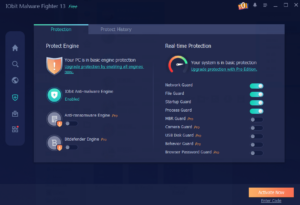
Real-time protection continuously monitors your system and blocks threats as soon as they appear. Whether it’s malicious downloads, ransomware attempts, or suspicious scripts, IObit Malware Fighter prevents malware from infecting your computer before damage is done.
2. On-Demand Scanning
With on-demand scanning, you can manually scan your system anytime. This is ideal if you suspect suspicious activity or want to check specific files or folders.
3. Smart Scan
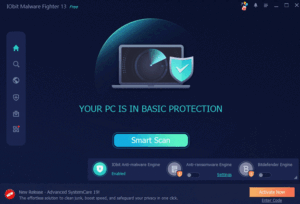
The Smart scan option checks critical system areas in minutes. It’s perfect for daily use, offering fast results without affecting performance.
4. Deep Scan
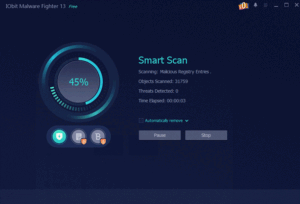
For thorough protection, deep scan examines your entire system in detail. While it takes longer, it detects hidden and advanced threats that quick scans might miss.
5. Junk File Cleaner
Over time, junk files accumulate and slow down your computer. The built-in junk file cleaner removes unnecessary files, frees up disk space, and improves system speed.
6. System Optimizer
IObit Malware Fighter also optimizes system settings to enhance overall performance. This ensures your PC runs smoothly while staying protected.
7. Privacy Protector
Privacy protection is one of the program’s strongest features. It blocks online trackers, prevents unauthorized access to sensitive data, and secures your browsing activities from prying eyes.
Step-by-Step Guide to Using IObit Malware Fighter
Step 1: Download and Install
Visit the official website and download the free version of IObit Malware Fighter. The installation process is quick and beginner-friendly. Once installed, launch the program to access the dashboard.
Step 2: Initial Scan
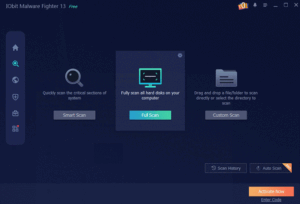
After installation, run an initial scan. This first scan helps identify existing threats, junk files, or vulnerabilities on your system. You can choose between quick scan or deep scan based on your needs.
Step 3: Enable Real-Time Protection
Make sure real-time protection is turned on. This ensures continuous monitoring and blocks threats automatically, even when you’re not actively scanning.
Step 4: Configure Browser Protection
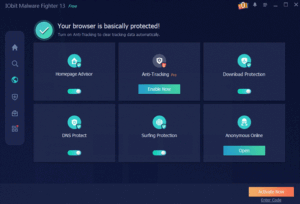
Enable browser protection to secure your online activities. This feature blocks malicious websites, phishing attempts, and tracking scripts that compromise privacy.
Step 5: USB and External Device Protection
External devices are common sources of malware. Activate USB protection so that any connected flash drive or external hard disk is scanned automatically before access.
Step 6: Behavior Guard
Behavior Guard monitors running programs for suspicious actions. Even if malware is new or unknown, abnormal behavior triggrs alerts and stops potential threats in real time.
Step 7: Schedule Regular Scans
Set up scheduled scans to maintain long-term security. Automated scans ensure your system stays clean without manual effort, providing ongoing privacy protection.
How IObit Malware Fighter Protects Sensitive Data
IObit Malware Fighter goes beyond basic malware removal. It actively defends sensitive data by:
- Blocking spyware that collects personal information
- Preventing unauthorized access to files and system processes
- Stopping browser trackers and data-harvesting scripts
- Detecting keyloggers that steal passwords
This layered protection approach makes it highly effective for users who store important data or frequently use online services.
Who Should Use IObit Malware Fighter?
IObit Malware Fighter is ideal for:
- Everyday users who want strong privacy protection
- Students and remote workers handling sensitive documents
- Online shoppers and digital payment users
- Anyone experiencing slow system performance due to malware or junk files
Its simple interface and automated protection make it suitable for both beginners and advanced users.
Final Thoughts
Privacy threats are growing more sophisticated, and relying on basic security tools is no longer enough. A complete solution like IObit Malware Fighter provides real-time protection, advanced scanning, system optimization, and powerful privacy safeguards—all in one package.
By following the steps outlined in this guide and using its features correctly, you can significantly reduce the risk of data theft, tracking, and malware infections. Whether you’re protecting personal files or ensuring safe browsing, IObit Malware Fighter is a smart choice for maintaining digital privacy in an increasingly connected world.