You’ve double-clicked that important ZIP file, and suddenly a password box appears. You try a few passwords, but nothing works. Now you feel stuck because you forgot zip password details that once seemed obvious. This problem happens more often than people admit. Many users try random tools or risky websites and make things worse. This guide explains how to open password protected zip file using safe and legal methods. It also covers a case most guides ignore: what if the ZIP file is damaged as well as locked? There is no magic button, but the right steps and tools can help you recover your files.
Part 1: First Steps & Simple Checks (Before You Try Anything Advanced)
Before you try to unlock zip file access using tools, stop and check the basics. These steps save time and avoid risk. First, retrace your steps. Check old emails, message apps, saved notes, or your password manager. Many users store ZIP passwords without realizing it. If someone sent you the file, ask them again. Next, try common passwords. For personal files, people often use simple passwords like their name, date, phone number, or device name. This step works more often than expected. Now do a critical check. Try extracting the password protected zip file. If you see errors like “archive is corrupt” or “unexpected end,” the file may be damaged. In this case, even the correct password will fail. You may face a corrupted zip file issue, not just a password problem.
Part 2: The Strategic Approach: Choosing the Right Method
You should choose your recovery method based on what you know about the ZIP file. One approach does not fit all cases.
Scenario A: You believe the password is correct, but the file will not open. This often means the ZIP file is damaged. You should fix the file first before trying zip password recovery.
Scenario B: You remember part of the password or a clear hint. In this case, dictionary or mask methods work best. These methods reduce guess time.
Scenario C: You have no idea about the password at all. A full brute-force method becomes the only option. This method tries every possible combination and takes a lot of time.
Scenarios B and C need zip password recovery software. You should only use trusted desktop tools to crack zip file password access safely.
Part 3: Scenario A: When the ZIP File Itself Is Corrupted
Many users overlook this step and lose valuable time trying passwords that will never work. A corrupted ZIP file fails to open even when you enter the correct password because the problem exists in the file structure, not in the security layer. Issues like incomplete downloads, sudden system shutdowns, USB transfer errors, or bad storage sectors often damage ZIP archives. In such cases, password recovery tools cannot help at all. You must repair the ZIP file first to make it readable again. A dedicated solution like 4DDiG File Repair, part of its Document Repair suite, rebuilds the ZIP container so you can later open password protected zip file using the correct recovery method.
Key Features of 4DDiG File Repair
- Repairs corrupted ZIP files affected by incomplete downloads, file transfer errors, or storage failures while keeping the original file structure intact
- Supports password protected zip file repair, allowing users to fix damaged archives before attempting any password recovery process
- Simple repair process that requires only adding the file and starting the scan, making it suitable for non-technical users
- Works offline on your system, which helps protect sensitive data and avoids the risks of online ZIP repair tools
- Handles multiple document formats in one tool, making it useful when ZIP files contain important or mixed file types
Simple repair process:
Step 1: Add the corrupted password protected ZIP file to the repair software so it can start analyzing the file structure.
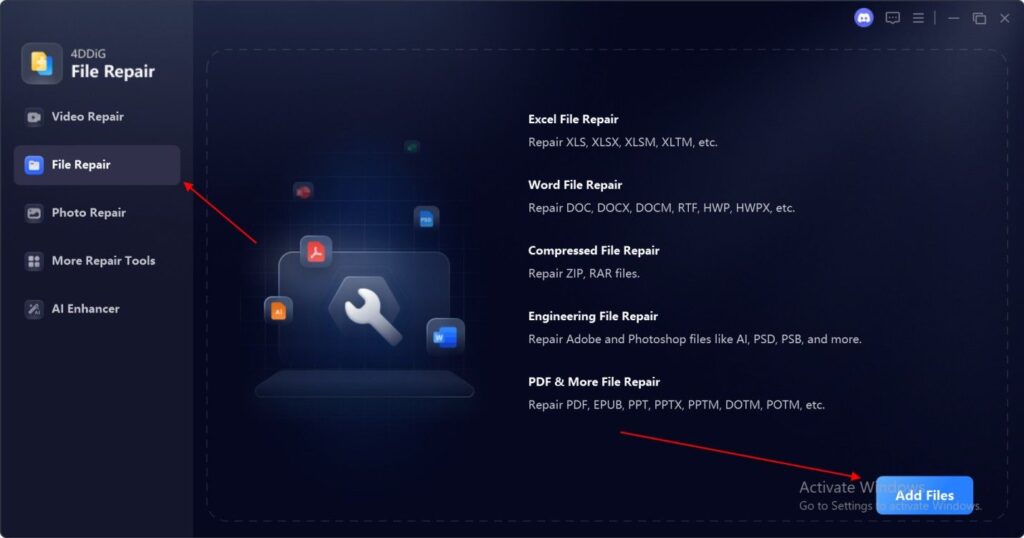
Step 2: Let the software repair the ZIP container structure by fixing errors caused by incomplete downloads or transfer issues.

Step 3: Get a working but still encrypted ZIP file that opens normally and allows you to proceed with zip password recovery methods.
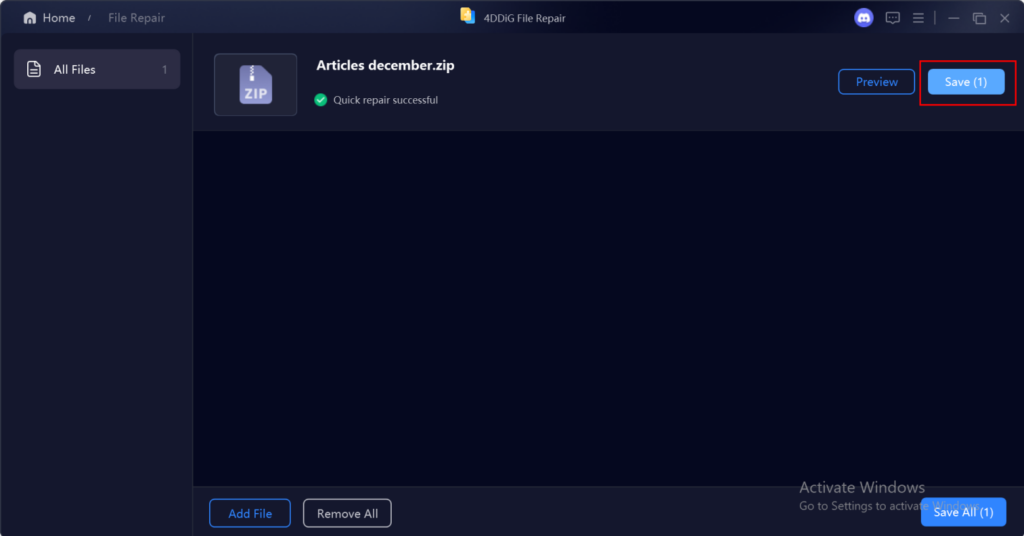
After repair, you can move forward with zip password recovery methods. This step removes a major block that many users never identify.
Part 4: Scenarios B & C: Using Password Recovery Software
If your ZIP file works but still asks for a password, you need password recovery software. This method applies when you forgot zip password details or never knew them.
How Password Recovery Works
A dictionary attack checks common words and saved password lists. It works well when users use simple passwords. A brute-force attack tries every possible combination. It works in all cases but may take hours, days, or even longer.
How to Choose the Right Tool
When choosing a zip file password remover, look for these features:
- Support for AES encryption
- Dictionary, mask, and brute-force options
- GPU acceleration for faster results
- Offline processing for safety
Avoid online tools that ask you to upload files.
General Process Flow
- Load the ZIP file into the tool
- Select the attack type
- Set password length and characters
- Start the recovery process
- Extract files after you recover zip file password access
Only use these tools for files you legally own. Strong passwords may take a very long time to crack zip file password protection.
Part 5: What NOT to Do & Final Recommendations
Do not use free online ZIP password tools for private data. These services upload your file to unknown servers and create serious privacy risks. After you open password protected zip file, back up the extracted files immediately. Use a password manager to store future ZIP passwords safely and avoid this problem again. Knowing how to open encrypted zip file content saves time and stress. Always start with simple checks. Repair the file if needed. Then choose the right recovery method based on what you know. This step-by-step approach gives you the best chance to regain access without damaging your data.