


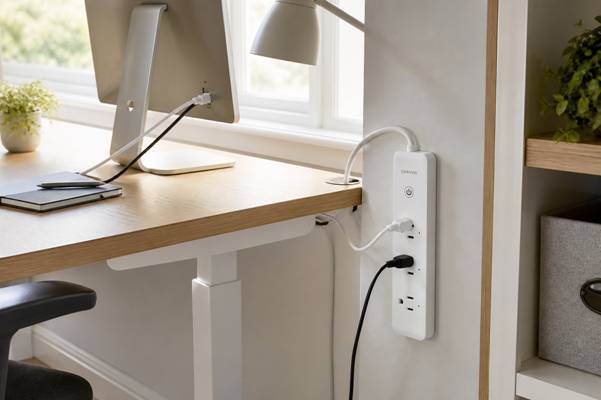
A compact power hub can keep core office devices together while leaving plugs and cables visible for routine checks.
The home office has changed from an occasional convenience into a permanent working environment for many people. Laptops share space with monitors, lamps, speakers, chargers and networking equipment. Each device may be small, but together they create a power system that deserves the same thought as lighting, storage and ergonomics.
A good setup is not the one with the most sockets. It is the one that supports the equipment used every day, keeps cords out of the way and makes it obvious what can be switched off. A few deliberate decisions can turn a nest of adapters into a workspace that feels calmer and behaves more predictably.
The Power Setup Is Part of the Workspace
Power accessories are often added last, after the furniture is in place. That usually means a strip is dropped on the floor, cables are stretched behind a cabinet and oversized adapters compete for the same outlets. The arrangement works, but only until something needs to be moved or replaced.
Treat power as part of the layout instead. The desk position, wall receptacle, cable route and device locations should form one system. When these elements are planned together, cords can follow short, protected paths and the power hub can remain accessible without dominating the room.
Map the Devices Before Buying Anything
Start by listing the equipment that genuinely belongs at the desk. Separate it into three groups: devices that stay connected, devices used only during work and chargers that come and go. This quickly reveals whether the workspace needs a fixed hub, a portable charging point or simply fewer adapters.
Check the plug shapes as well as the total count. A large transformer may cover a neighbouring outlet even when the numbers look sufficient. Leave one connection free if possible, so a temporary device does not force you to unplug essential equipment or stack adapters.
Create One Clear Control Point
A small office is easier to manage when its non-essential equipment has an obvious control point. A compact option such as the LinkVolt smart power strip can group a monitor, task light and another everyday device in one visible location. The aim is not to connect everything in the room; it is to create a defined office zone that can be checked without crawling behind furniture.
Place the strip where the switch and plugs are reachable but protected from feet, chair wheels and spilled drinks. If it is mounted vertically or beneath a desk, make sure the attachment is secure and the cord is not bearing the weight of the connected plugs.
Match the Equipment to the Circuit
Not every electrical device belongs on the same office strip. High-demand appliances, heaters and equipment identified by the manufacturer as requiring a direct wall connection should be treated accordingly. Never assume that an available socket means the connected load is appropriate.
Read the rating on the power accessory and the guidance supplied with each device. Avoid linking one strip to another, and replace any unit that feels loose, shows heat damage or has a frayed cable. A tidy installation still needs to respect the electrical limits behind it.
Use Smart Features With a Clear Purpose
Connected power controls are most useful when they support a simple habit. A schedule might switch off a desk lamp after working hours, while remote control can help confirm that a non-essential device was not left running. The value comes from reducing a repeated point of friction, not from automating every socket.
Keep networking equipment and anything that must remain available outside working hours separate from the office shutdown group. Test each routine before relying on it, and retain a manual way to operate important devices if the app or network is unavailable.
Make Every Cable Easy to Inspect
Cable boxes can hide clutter, but they can also hide damage and trap heat when packed too tightly. Use clips, sleeves or an under-desk tray to guide cables without crushing them. Leave enough slack for a sit-stand desk or movable monitor, but not so much that loops fall into the path of a chair.
Label similar adapters at both ends. This small step makes troubleshooting faster and reduces the chance of disconnecting the wrong device during a call. When the whole route is visible, routine checks take seconds rather than becoming a furniture-moving project.
Build a Simple Shutdown Routine
At the end of the day, close work applications, let computers complete their normal shutdown process and then switch off the non-essential accessories that do not need standby power. The routine creates a clear boundary between working and living while reducing the number of devices left active overnight.
Review the setup whenever a new monitor, printer or accessory is added. Home offices grow gradually, and a clean system can become overloaded through a series of seemingly harmless additions. The best time to reorganise is before the next cable becomes permanent.
A Better Workspace Is Easier to Understand
Reliable home-office power is less about buying more hardware than creating clarity. Each device should have a reason to be connected, each cable should have a protected route and each control should be easy to reach.
Once those basics are in place, the electrical side of the office stops demanding attention. The desk looks cleaner, changes are simpler and the workspace is ready to support the next working day without another round of cable untangling.